
More than half of global web traffic now comes from smartphones. For many users, the mobile screen is their primary gateway to the internet. This shift has made mobile-first design a critical principle in UI/UX. Instead of designing for desktop first and shrinking it down, mobile-first starts with the smallest screen and scales up.
1. What Is Mobile-First Design?
Mobile-first design is a strategy where the mobile experience is prioritized during the design process. The idea is simple: design for the most constrained environment first, then add complexity as screen space increases.
👉 Example: A website’s core features (like search, product pages, checkout) are designed to work seamlessly on mobile before expanding into richer desktop layouts.
2. Why Mobile-First Matters
User Behavior – People spend more time browsing and shopping on their phones than desktops.
Performance – Mobile-first ensures lightweight, fast-loading pages.
SEO Advantage – Google uses mobile-first indexing, meaning it ranks sites based on their mobile version.
Accessibility – Prioritizing mobile often improves usability for all devices.
3. Core Principles of Mobile-First Design
Prioritize Content
Show the most important features first. Secondary elements can appear lower or be hidden behind menus.
Simplify Navigation
Mobile screens have limited space. Use clear icons, collapsible menus, and intuitive gestures.
Optimize Touch Interactions
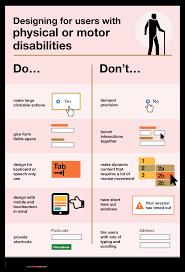
Buttons and links must be large enough for fingers, with enough spacing to avoid accidental clicks.
Load Fast
Mobile users expect quick access. Compress images, minimize code, and use lazy loading where possible.
Progressive Enhancement
Start with mobile basics, then enhance layouts with larger screens (e.g., sidebars, animations, extra visuals).
4. Benefits for Users and Businesses
Better UX – A smooth mobile experience increases engagement.
Higher Conversions – Mobile-friendly checkouts reduce cart abandonment.
Broader Reach – Works well in regions where mobile is the primary device.
Future-Proofing – Ensures compatibility with wearables and smaller screens.
5. Challenges of Mobile-First
Content Limitations – Not everything fits on a small screen; prioritization is critical.
Complex Workflows – Some advanced features may need creative simplification.
Testing – Must be tested across many devices and operating systems.
6. Examples of Mobile-First Success
Instagram – Built for mobile first, with desktop added later.
Airbnb – Mobile-friendly booking process increases trust and usability.
Google Maps – Designed for mobile use, with location-first functionality.
Conclusion
Mobile-first design isn’t just a trend—it’s a necessity in today’s digital world. By prioritizing performance, content, and usability on small screens, designers create experiences that feel seamless everywhere. For businesses, adopting mobile-first is no longer optional if they want to stay competitive.