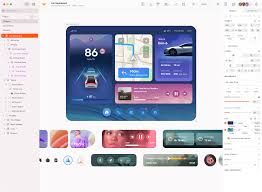
Sketch is a vector-based design tool widely used in UI/UX design, particularly for macOS users. Known for its clean interface and strong plugin ecosystem, Sketch has long been a favorite among designers creating websites, mobile apps, and digital products. This guide introduces the basics of Sketch to help beginners get started with UI design.
1. Why Choose Sketch?
UI/UX Focused – Built specifically for digital design.
Lightweight – Runs smoothly, even on older Macs.
Scalable Vectors – Perfect for designing responsive interfaces.
Plugins & Integrations – Extend functionality with thousands of plugins.
Collaboration – Works with Sketch Cloud for sharing and feedback.
2. The Sketch Workspace
Canvas – The main design area.
Inspector Panel – Displays properties like size, color, and effects.
Layers List – Organizes elements and groups.
Toolbar – Contains drawing tools, shapes, and symbols.
Pages & Artboards – Structure your project into different screens or sections.
3. Key Tools and Features
Artboards – Define screen sizes for web and mobile design.
Shapes & Vector Editing – Create rectangles, ovals, polygons, and custom paths.
Symbols – Reusable elements like buttons, icons, and navigation bars.
Text Styles – Maintain consistent typography across your design.
Shared Styles – Apply the same color or effect to multiple elements.
4. Basic Workflow in Sketch
Create a New Document – Start with File > New.
Add an Artboard – Choose a device preset (e.g., iPhone, Desktop).
Design UI Elements – Use shapes and text to build the interface.
Convert Elements to Symbols – Make reusable components.
Apply Styles – Ensure consistent colors and typography.
Export Assets – Save icons, images, or entire screens for developers.
5. Collaboration in Sketch
Sketch Cloud – Share files with clients and teammates for feedback.
Hand-off to Developers – Use integrations like Zeplin or Sketch Inspect for specs.
Plugins for Workflow – Extend collaboration features (e.g., real-time comments).
6. Tips for Beginners
Use grid and layout settings to maintain alignment.
Learn keyboard shortcuts to speed up design tasks.
Keep your symbols and styles organized for large projects.
Explore Sketch plugins like Craft (by InVision) to enhance productivity.
7. Advanced Features to Explore
Prototyping – Create clickable mockups directly in Sketch.
Design Systems – Build reusable libraries of symbols and styles.
Responsive Resizing – Make elements adapt to different screen sizes.
Conclusion
Sketch remains a powerful tool for UI/UX designers, particularly those working on macOS. With its focus on digital design, symbols, and strong plugin ecosystem, it simplifies the creation of responsive, scalable interfaces. By learning the basics of artboards, symbols, and styles, beginners can quickly start designing professional user interfaces with Sketch.